From legal text to data pipeline: the Battery Regulation CFF
About this project
I was asked to build an automated version of the Circular Footprint Formula (CFF) for batteries, following the draft delegated act under the EU Battery Regulation.
The CFF sits downstream of the carbon footprint. It uses the carbon footprint’s emission factors, and in this project the carbon footprint was being done at the same time. A lot of the work was keeping the two in step. I worked out which parts of the pipeline could be built without the carbon footprint and built those first. The wiring to the carbon footprint came at the end, once it was clear what its results looked like.
The two also see materials differently. The carbon footprint was done on its own set of materials. The CFF has its own material types, and they decide where each mass in the bill of materials goes in the pipeline. So there had to be a mapping between the two, to make sure the CFF used the right emission factor for each of its materials. The project covered one battery model, so I did that mapping by hand instead of building it into the pipeline.
The calculation rules are in the legal text, but the act was an early draft and some things in it were still unclear. It had not been adopted when the project ended, so the result was never used in an official declaration.
The output is one table that can be printed as it is. It shows the total, each of the six terms on its own line, and the parameters and sources behind them. Because the terms are kept apart, you can see which ones carry the credits from recycling.
This was client work. The template and the data belong to the client, so this page has no figures, screenshots or code, and nothing about the company or the battery.
The problem
The Battery Regulation will require a carbon footprint declaration for batteries in scope. In the draft rules, recycled content and end of life are modelled with the Circular Footprint Formula (CFF): six terms, applied material by material, then summed.
The formula is convoluted, and translating it was the hardest part of the job. It draws on three sources: the bill of materials, the act’s own default tables, and the carbon footprint study, whose emission factors and per-material results my calculation depended on. The people who hold that data work in Excel with formulas. They don’t think in joins and transformations. So the job was two things at once: turn the legal text into a pipeline that gets every edge case right, and make it usable by people who will never open the query editor.
What the pipeline does
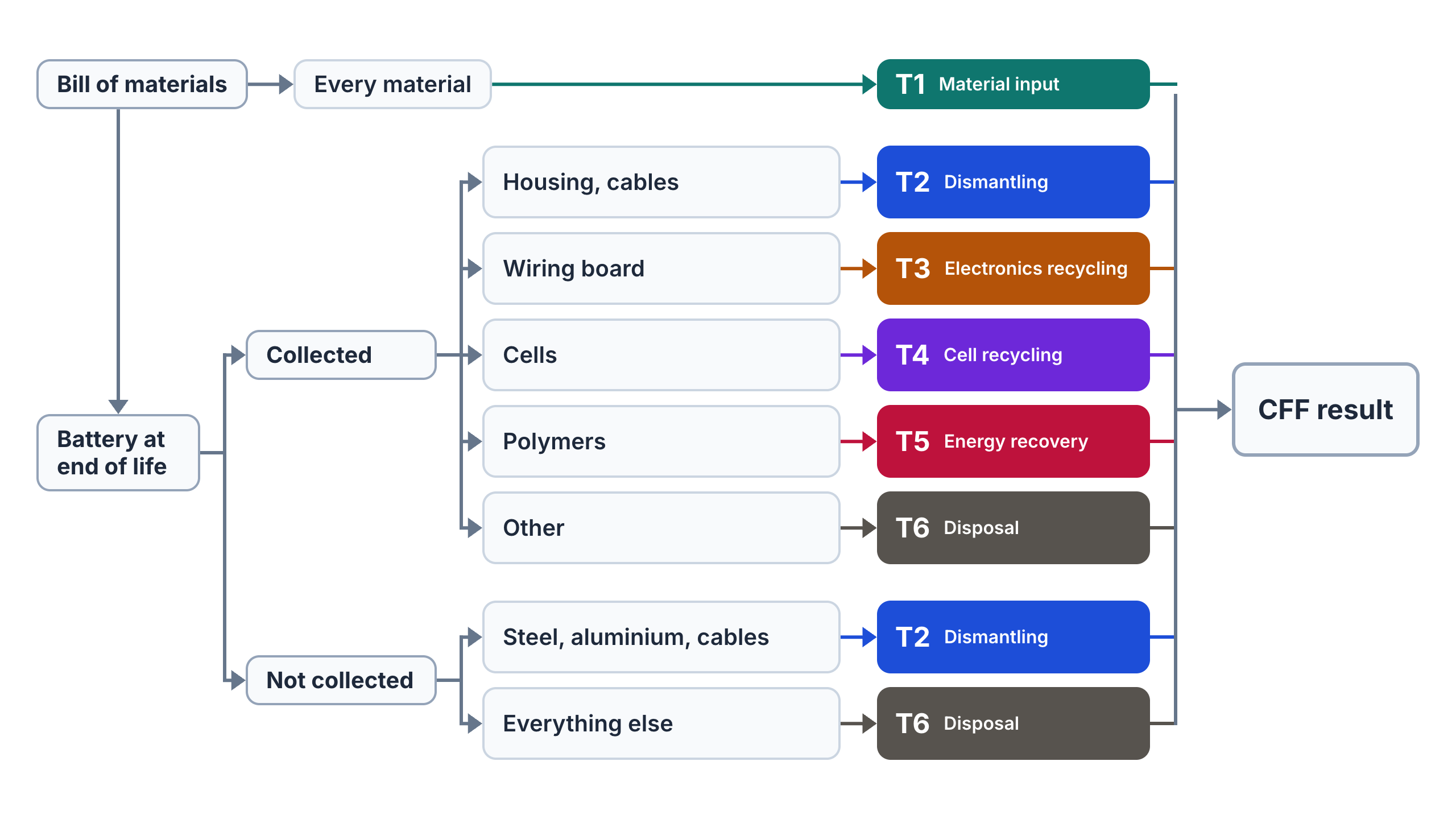
The pipeline takes a bill of materials in, routes every material to the flows below, and returns each of the six terms separately. That way the result can be traced back to where it comes from, instead of being read as a single total.
The diagram shows that routing as the draft act sets it out. The bill of materials is the starting point for all six terms. It gives the mass of every material, and the material type that decides its route and, for most routes, its emission factor. Making the battery is one term. End of life is the rest, and the same bill of materials is the assumption for what the battery contains when it comes back. The return rate splits the battery into a share that is properly collected and a share that is not. Each share is dismantled into fractions, each fraction has a treatment, and each treatment feeds one term. The six terms are then summed into the battery’s CFF result.
Working with the legal text
Most of the work was translation. Before building anything I wrote the legal text out as a Markdown document and marked every place where the draft was unclear or could be read more than one way. I also worked on that document with AI, which was one more reason to spell the ambiguities out. For each one I wrote down the assumption I was building on.
The formula’s notation had to move into Excel too. Subscripts and superscripts are hard to work with in Power Query, so every term got a name in capital letters, and the workbook has a dictionary that says what each one means and where the draft leaves it open.
Working with the people who own the numbers
The carbon footprint analyst held the inputs my formula depended on, and was working out the carbon footprint while I was building the CFF. I tried to be clear about what I needed and in what form, and built the template so it could be used without opening a query. I shared results as I went, and told the project leader where the time was going and where I was stuck.
What I learned
- Read the legal text for ambiguities before building. Ambiguities in the draft came back later as problems in the pipeline. So I looked for them up front, wrote down an assumption for each one, and built on those assumptions.
- Design for the system’s constraints, and fail early. A pipeline in Excel can run for a very long time, so the design started from that constraint. And in a legal calculation no error is acceptable: every edge case is handled, and a gap stops the run instead of slipping through as a zero.
- Keep parameters out of the logic. The act’s default tables and the battery-specific inputs live as data, so a new battery model means new inputs, not a new model.
- Say it more than once. The analyst was mapping out the carbon footprint at the same time, and learning along the way. I couldn’t assume that what I had explained at the start had landed. I learned to repeat what I was producing, what I needed from the analyst, and what the later steps of the CFF needed it for.